




Reciprocity
Members
-
Joined
-
Last visited
Everything posted by Reciprocity
-
Big congrats on 9 months Christa. That's fabulous and yes, having an easier time is a blessing. That doesn't happen often. Stay vigilant though and we'll be soon celebrating your 1 year! Now, where you at? We're already partying in recognition of this anniversary. Common down!!
-
Big Congrats on making the 2 Year smoke free mark C9J!! Your contributions are much appreciated by many. Stop by and pay us a visit - we don't bite Speaking of 2 and Glitter well .....................
-
-
-
I believe her cruise is done tomorrow. Not sure when she's arriving home though. Late tomorrow or Wed. perhaps?
-
Congrats Fay 6 Years is Huge!
-
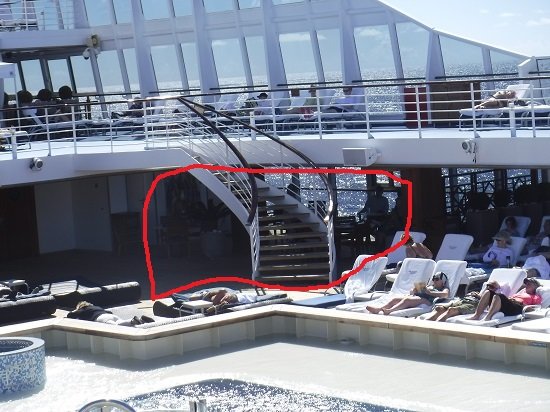
Distractions are good!Is there someone at the institution you are studying at who you can contact to see why they haven't been posted yet or, maybe another student you know to see if they are still waiting as well? Would ease your stress level if you could speak to someone else in the same position as you. Good job on not smoking though. You know it would make no difference at all in getting your results.Congrats on 2 months smoke free QueenB! Celebrate your fabulous achievement then push on to even greater heights!Congrats Lilly on reaching 2 months smoke free. I'm sure you are not only happy but very proud too, as well you should be! Take those taste buds out and treat them to something Yummy!Yes, that Red circled area is the "smoking area" and most of the ships I have been on are the same. I agree that it's strange having them all huddled under cover because it does hold the smoke in there more than if it were completely open. I was on one ship where the smoking area was up on the top deck in a completely open area but most are not. Maybe it's covered so people can still smoke when it rains or maybe so ashes aren't blowing all over the place? Frankly, I'm surprised not one cruise line that I'm aware of has banned smoking all together - not one! It's a huge fire issue as you can imagine. You don't want to be floating in the middle of the ocean with a fire breaking out. I'm betting some cruise line will do it sometime soon. It's a very small percentage of people that I see smoking on a cruise so they aren't going to lose too many customers if they ban it outright and a lot of their non smoking customers would applaud them for having a smoke-free cruiseSpoke to my Mom this morning by phone to wish her a Great Day! Can't be with her as she's too far away but there in spirit Happy Mom's day to all. Moms are the best!!Last cruise I was on, I only felt sorry for the people who were huddled underneath the stairwell smoking all day long. Same people, all the time, every day = slavery to addiction 😒 Why not take full advantage of the $$ you have spent to go on a cruise instead of huddling under cover smoking? Just goes to show how powerful this addiction is.
 The good people here never forget the struggle they endured so they understand what you are going through and will continue to support you through your entire quit journey and then some so, no worries there. You just need to focus on quitting for you and your future well being.The title of this thread says it all. That's exactly what I feel now when I see some poor soul standing alone feeding their addiction while the world passes them by. As Boo said; there's nothing to miss about smokingLooks like we're having duck for Mother's Day Dinner!!
.thumb.JPG.2650a885377588574d3d0817926e74c1.JPG) There's been a small issue with D's cruise .......... I heard she made it out OK tho!
There's been a small issue with D's cruise .......... I heard she made it out OK tho! One is the new Two!! Keep going forward. You are destined to be smoke free @Ankush!!Congrats on reaching 10 months Jay!Nice job MD!!Shame over relapsing, although completely understandable, provides NO positive benefit. Put that aside as quickly as possible and double down on your commitment to quit for good. Learn from whatever happened and expect it to happen again so you can get past it successfully next time. As long as you learn something about yourself and your addiction from a relapse and jump right back into quitting then you are making progress. Remember; this is not a race to the finish it's a journey and as long as you get there eventually then it's worth your while and all the struggle you might face.





.JPG.6316bd7b1c5934451e3a5954772349f9.JPG)