




Reciprocity
Members
-
Joined
-
Last visited
Everything posted by Reciprocity
-
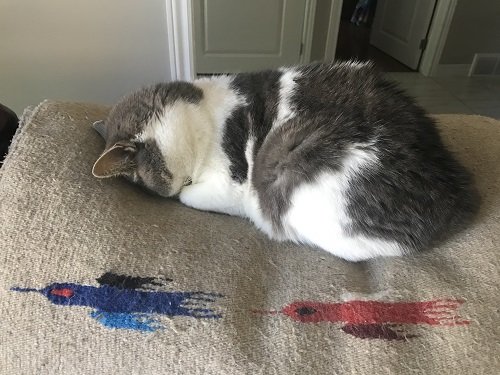
My cat actually sleeps that way - Face Plant 😆
-
7 Meant to ask @Stewbum; Washington State or Washington D.C.? Just curious.
-
-
Nope!I must say, on occasion, I've been know to ignore the healthy eating protocol!
 6 Would appear you've left to go do your chores for the day?
 Nope!Not a cookie eater here either buy yeah, makes sense the tobac cos. would use similar tactics in their food products ... make them irresistible!!Nope!Did you not feel that way when you pledged N.O.P.E. with smoking? Life will never be the same 😢 Yet, I expect now you are perfectly happy with not having to light up when ever there might be a trigger to do so. The same would likely be true with alcohol I expect. Tough road to get there but you WOULD get there if you wanted it badly enough! Quitting any addictive substance always has to be an individual decision. There are certain things in my life that I know aren't doing me any good health wise but I refuse to give up everything and just be miserable. These are all things only we can judge for ourselves. I hope you do what ever makes you the happiest in the long run! We can all learn to live without things we think we have to have but with me, it's not worth living if you're without everything that gives you pleasure & comfort. We all have to make those decisions for ourselves. I think it's a balancing act for all of us.Nope!






Important Information
Account
Navigation
Search
Configure browser push notifications
Chrome (Android)
- Tap the lock icon next to the address bar.
- Tap Permissions → Notifications.
- Adjust your preference.
Chrome (Desktop)
- Click the padlock icon in the address bar.
- Select Site settings.
- Find Notifications and adjust your preference.
Safari (iOS 16.4+)
- Ensure the site is installed via Add to Home Screen.
- Open Settings App → Notifications.
- Find your app name and adjust your preference.
Safari (macOS)
- Go to Safari → Preferences.
- Click the Websites tab.
- Select Notifications in the sidebar.
- Find this website and adjust your preference.
Edge (Android)
- Tap the lock icon next to the address bar.
- Tap Permissions.
- Find Notifications and adjust your preference.
Edge (Desktop)
- Click the padlock icon in the address bar.
- Click Permissions for this site.
- Find Notifications and adjust your preference.
Firefox (Android)
- Go to Settings → Site permissions.
- Tap Notifications.
- Find this site in the list and adjust your preference.
Firefox (Desktop)
- Open Firefox Settings.
- Search for Notifications.
- Find this site in the list and adjust your preference.