




Reciprocity
Members
-
Joined
-
Last visited
Everything posted by Reciprocity
-
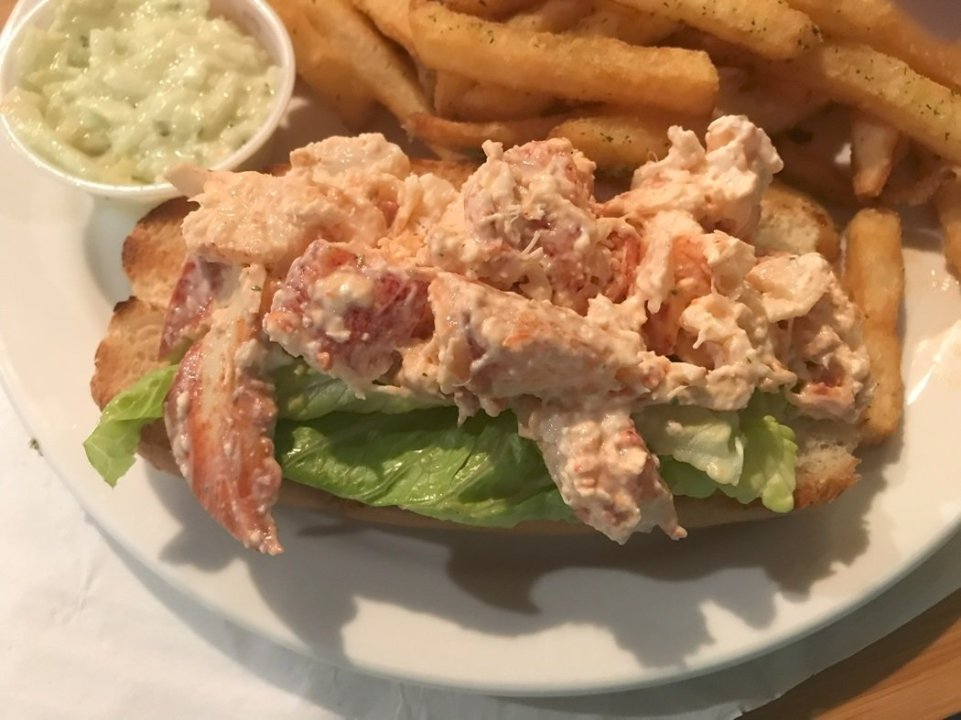
Yes! Quitting nicotine is a marathon; not a sprint! Meaning that you have to keep your original goal in your mind long term. Never forget why you quit! It's as important today as it was day 1. It will continue to be as important months from now. That's what we mean when we say "stay on guard", even when you feel you've got the addiction beat. Don't ever let the addiction seduce you into your old vaping ways. Trust me, your addiction will continue to try and fool you for some time. If you remain committed, you'll be fine.Here's the place we ate dinner twice😍 It's called Steamers in downtown Saint John; N.B. That's our waiter; behind the bar working hard for us 😉 Another view of the interior. You can see the mini Lobster Pound (where they keep circulating sea water in a series of white & turquoise tubs to keep the lovely critters alive and healthy until you order one. Then it's ☠️ for the poor Lobster and 😋 for you!) The stacked shallow tubs are where the little critters live. You can go up & pick your own if you like The local beer is called "Moosehead". It's brewed in Saint John by the Oland family. My dad was good friends way back when with Paul Oland, one of the sons of the original start-up owner. I'll say it's similar to a Coors Light; which some of you may be familiar with. Moose Light is their "light" version of Moosehead. Now for the food features 🤩 Lobster Roll with the best french fries I've had in a long, long time. Don't know what they coat them with but Oh So Yummy! There's NO filler in the Lobster Roll. Just tender, juicy Lobster, fresh from the ocean with a little mayo mixed in on a lightly toasted roll (OMG; I'm making myself hungry again 😲 These Bacon Wrapped Scallops are no sloutch either! The scallops are sooo tender! I've never had melt in my mouth scallops before and the perfectly cooked bacon wrapped tightly around the scallops ... I don't know how they do it but they're absolutely amazing 🤤 They don't look like much but a cup of seafood chowder & 6 of these golden nuggets of heaven and you'll want for nothing else! Well, maybe another cocktail?


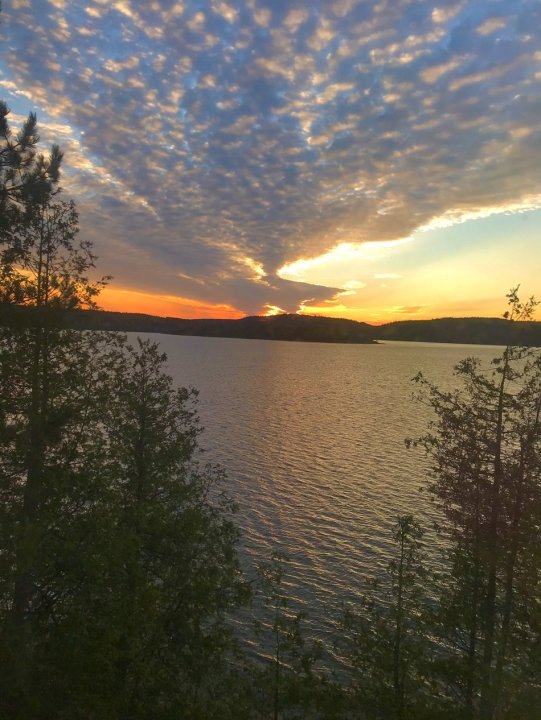
 You're kickin' it Bud!! 11 down & one to go for a raucus Lido Deck Blow-Out. Can't wait to be amoung many pipping you onto the Lido Deck next month. Let's do it 👍
 In Saint John New Brunswick since late Thursday, we’ll; turned into early Friday morning with flight delays 😒 Didn’t hit the bed at the hotel until almost 5:00 AM 😴💤 & had meetings at 11;00 AM & 11:30 AM. Went for Mom’s funeral, which was delayed a month so everybody’s schedule could match up. 9 out of 10 Grandchildren showed up from all across Canada. That tells you how well loved Gramma was🥰 We’ve been meeting up for dinner every night since Friday & tonight’s the last supper, so to speak. Of course, they’ve all been at seafood places because we’re right by the ocean! Hard on the wallet but yummy, yummy, yummy in the tummy😍 Flying back home tomorrow afternoon. Will check in then for the major celebrations 🎉🥳🎊🍾Glad to hear your quit is still going strong @Dejvis93! Remember that that damn vaping never did 1 good thing for you. It only drained your wallet & stole your personal freedom by enslaving you to nicotine!! you can likely see that better now that you’ve kicked that junk to the kerb👍You wanna try the CN Tower Edge Walk; right?Yeah; that Salted Caramel Cream stuff is the bomb. There's a regular Cream Whisky too so make sure he gets the Salted Caramel. He won't regret it 👍You book a hotel today, that's the price you'll pay when you stay there. The exchange on US/Can $$ may change by then but not your base hotel rate. The tower you ate in at the Falls is called the Skylon Tower. The CN Tower is much more spectacular in many ways. I have not done the Edge Walk myself as I have an aversion to pooping my pants in public! Wine country is just down the road from where I live now. It's called Niagara on the Lake. Very popular especially on weekends. If you have time on your way back, it's only about 15 mins off the QEW highway that takes you to the border. The downtown area is really quaint. Worth a short wander around the shops. My favorite winery in Niagara on the Lake with a retail store in it is Wayne Gretzky Estates (your husband will know that name lol). I love their Salted Caramel Cream Whiskey. It's like Baileys Irish Cream only much better 😍I'm not much of a wine drinker but they have lots of different wines there and also their own whiskies. With the exchange difference, if might be wise to take your alcohol limit back to the States with you and the Wine Country is the place to get it. Dozens of other wineries in the area as well! This area is also where the Welland Canal is. That's the series of locks that transitions large Lake Freighters around Niagara Falls. Any ship travelling on the great lakes must go through this canal. There's even a Welland Canal museum in the area. Interesting stuff. If you're into Wineries, you could easily spend two full days in Niagara on the Lake and Oct. is probably harvest time there as well I expect. Better extend you trip - lol!


 We are all nicotine addicts for life but, that becomes a non-issue once we bury our addiction by refusing to smoke/vape for a long period of time. Becomming a comfortable non-smoker/vaper is different for eveyone. You may be very comfortable in a short period of time but, remin on guard because that addiction is still there and will rear u an bite you in the a*s when you're most vulnerable so always be on guard! Typically it take a year to declare yourself comepletely free because there are triggers you'll come across at different times of the year. Memories of when you used to vape will haunt you during those times; Christmas gatherings, when seasons change a nd you'll remember vaping at hose times of the year etc. Just keep your commitment strong and you'll make it. As quitters will always tell you ... it only gets easier the longer you remain quit😉Nope!
 So .... (this is gonna be long; lol) Note this: Monday October 14th is Canadian Thanksgiving. That's not an issue really but it's a long weekend so not sure if hotel rates get jacked up then or not. Some stuff might be closed on the Monday holiday; probably NOT the tourist places. They are allowed to open on stat holidays. By the way, you won't recognize the place if you haven't been since you were a kid. Couple of tips here: gas up on the US side before you hit the border. US gas prices are cheaper. You won't know that when you hit Canada because our gas is priced in liters - not gallons. Almost 4 liters to a US gallon. If you are crossin the border at Niagara Falls NY or Buffalo, don't do that late in the day on a sunday or on Thanksgiving Monday. There's a ton of traffic going toward Toronto from the Niagara Wine Region at the end of a weekend. Stay away from that time frame - you'll thanks me later 😉 Yes there's Uber and all means of transport like that in Tor. Plus public transport. Subway and if you're in the mood, take a Street Car. Yes, we still have them. Not sure where you buy tickets for them but your hotel can tell you. You would be well advised to take other transport rather than drive much around the downtown area. They keep tearing the roads up and closing them down from time to time. I won't drive down there any longer. It's just too nuts for me. I don't have that much patience. The long holiday weekend may help with less traffic? The places you mentioned are pretty much all within walking distance of each other downtown providing the weather is half decent. Hotels are crazy expensive everywhere these days and Toronto will be no exception so look around for deals if there are any. Your American dollars will help easy the pain. If you are spending cash anywhere while you're here, tourist places, eateries & retail shops won't give you as good an exchange rate as the bank will. You might want to buy Canadian dollars before you leave from a bank or exchange outlet in NY. Using Credit Cards, the banking institution behid the card determines the exchange. The CN Tower is definately worth going up to the top. It's a little pricy though as I recall but again US dollars will help a lot! Dinner at the revolving restaurant in the Tower is cool; no question. You can see the lakeshore & Lake Ontario on one side & the city on the other side as it revolves. Again, it won't be cheap but it's a once in a lifetime thing! Check the weather though before you reserve. If there's gonna be really low clouds, you may be above them and see nothing 😒 If you do go, try and book dinner for about 5:30 PM. Sunset that time of year will be 6:37 PM. Going at 5:30 would give you a complete 360 view in daylight then a full one once the sun is down (city lights). I did that once and it was amazing (long time ago though). In terms of other sites/things to do; honestly, I would do a Hop-on; Hop-off bus thing day 1 just to see everything around Toronto. (Go to the Toronto Hop-on; Hop-off web site for info). You might come across something you want to check out plus they give you a narative of what's what around the circuit. Not sure what you guys are into but here's some examples of top attractions: 1.Royal Ontario Museum 2. The Historic Distillery District is a predestrian only area that's old buildings restored into shops and eateries. Nice for a wander around. 3. Art Gallery of Ontario. 4. Casa Loma - the only full size castle in North America; very cool with huge gardens, fountains & statues etc. 5. St. Lawrence Market, in the heart of Toronto's Old Town district and has existed since 1803. Lots of stuff for foodies and many eateries of different cusines. Accordint to National Geographic article in 2012, it the world's best farmers market! 6. If the weather's nice, you could take a ferry from downtown to the Toronto Islands - just offshore in Toronto harbour. No cars allowed, you can walk or rent a bike and ride around. Not a lot going on there in October I imagine. More of a summer spot. I was actually born there - Wards Island. Now, it's got a gay nude beach so yeah, there ya go. I doubt they'll be out there in Oct though 🫣 Yes, the Falls is always worth a short visit. Seeing the volume of water going over the falls never gets old. You're biggest expense there is parking but not that bad. Looking is FREE 😍. Well; that's about it I think. Man ... I'm outta breath after that diatribe. Oh yeah, one more thing ... when you go to the CN Tower, you guys should do the Edge Walk. Talk about a once in a lifetime experience 😱Nice work @Dejvis93! That's the hardest week of all and it's now in your past. Keep moving forward. You've got too much invested to give up now. Still one day at a time and you'll make it to your goal!In all seriousness; mid-Oct in Toronto is a mixed bag. You can expect anything from warm & sunny to cool and damp. There's almost a zero percent chance of seeing any snow. Probably not that much different than NY only a bit cooler? If you get lucky and we get what they call an Indian Summer, which is quite possible that time of year, it can be one of the nicest times of the year because it's not too hot & the summer humidity has gone for the year. You kind of have to pack clothing for either possibility. You won't need a winter coat or gloves and what not but you'll want both short & long sleeve tops for daytime & a light jacket or coat for when the sun goes down. More of a long pants season by then unless you hit a warm spell; then a pair of shorts may be in order for daytime wandering around. Are you flying or driving in?Mid-Oct? Yeah, no worries. Just bring a light jacket.
 I have full confidence in your dersire & ability to kick the Nicodemon's ass Stew! That's one hallmark of nicotine addiction that pisses me off the most. That bastard Nicodemon just lies in wait for stressful moments in life to descend on us then he rears his ugly head trying to undo all the good work we've done to quit. Not fair in the least!! 😡🤬 Kick him in the nuts Stew & be done with him!!









Important Information
Account
Navigation
Search
Configure browser push notifications
Chrome (Android)
- Tap the lock icon next to the address bar.
- Tap Permissions → Notifications.
- Adjust your preference.
Chrome (Desktop)
- Click the padlock icon in the address bar.
- Select Site settings.
- Find Notifications and adjust your preference.
Safari (iOS 16.4+)
- Ensure the site is installed via Add to Home Screen.
- Open Settings App → Notifications.
- Find your app name and adjust your preference.
Safari (macOS)
- Go to Safari → Preferences.
- Click the Websites tab.
- Select Notifications in the sidebar.
- Find this website and adjust your preference.
Edge (Android)
- Tap the lock icon next to the address bar.
- Tap Permissions.
- Find Notifications and adjust your preference.
Edge (Desktop)
- Click the padlock icon in the address bar.
- Click Permissions for this site.
- Find Notifications and adjust your preference.
Firefox (Android)
- Go to Settings → Site permissions.
- Tap Notifications.
- Find this site in the list and adjust your preference.
Firefox (Desktop)
- Open Firefox Settings.
- Search for Notifications.
- Find this site in the list and adjust your preference.